
Your Pet's Rabies Certificate Has Your Home Address on It

You just booked a new pet sitter. Great reviews, easy to talk to, and one simple request the night before: "Can you send me a picture of her shots?"
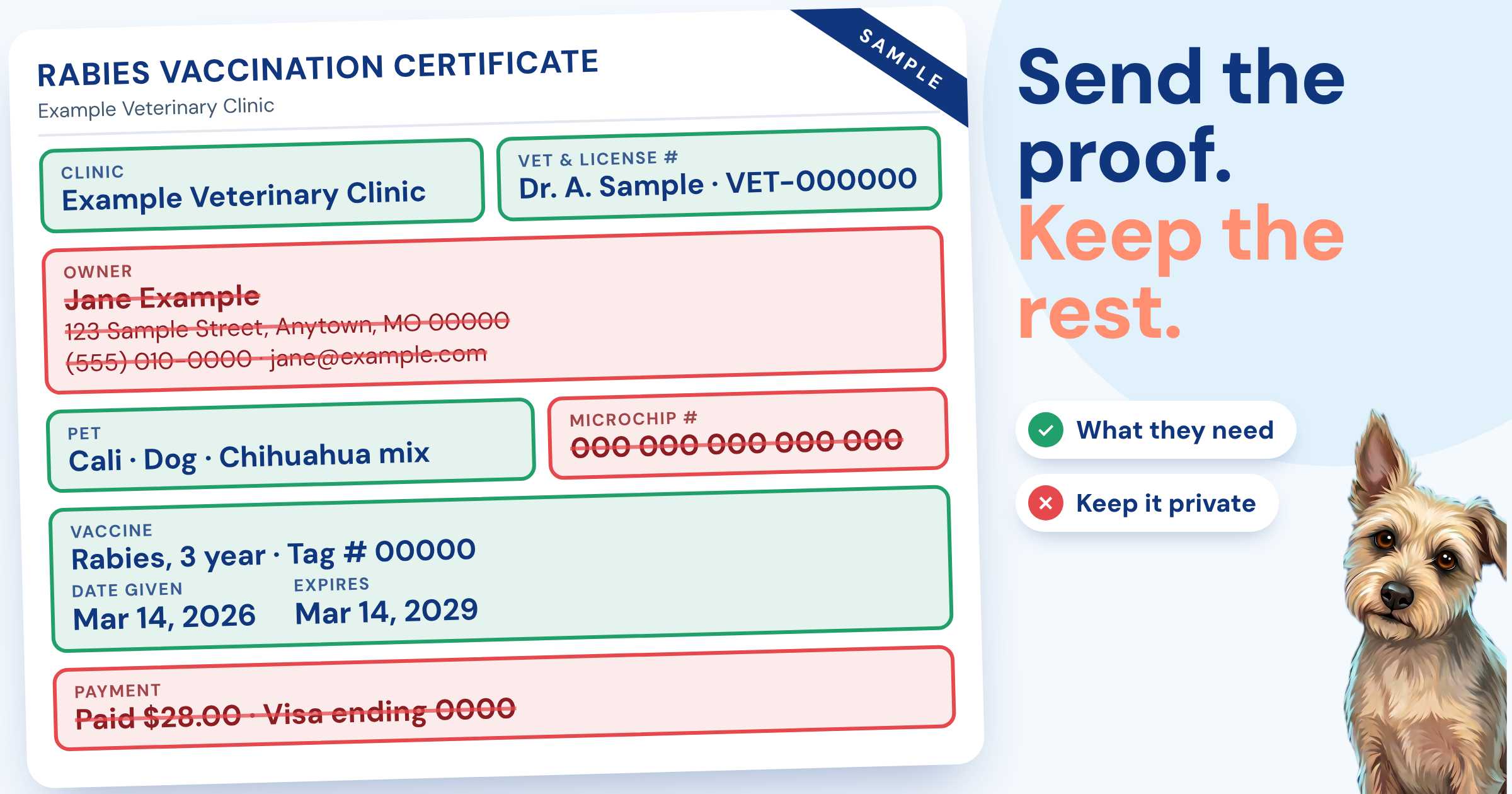
You open your camera roll, find the photo of the rabies certificate, and almost hit send. Then you actually look at it. Your full name. Your home address. Your cell number. Your dog’s microchip number. All of that, sent over text to someone you’ve met once, when all they needed to know was that your dog is vaccinated.
"Can you just send me a picture of her shots?"
Your Pet’s Paperwork Is Really Your Paperwork
We think of vaccine records as being about our pets. But most of that paper is about us. A rabies certificate usually lists the owner’s name, address and phone number right next to the vaccine details. Vet invoices and visit summaries often add your email and the clinic you use. Adoption papers can carry even more.
None of that is a problem when it stays between you and your vet. It’s the everyday sharing that adds up: a photo texted to a sitter, a PDF emailed to a boarding desk, a picture posted in a neighborhood group to find a groomer. Every copy goes somewhere you don’t control anymore.
Proof Is Not the Same as the Whole File
Most of the people who ask for records only need one thing: proof that your pet is up to date. A groomer wants to see rabies and bordetella. A boarding facility wants the vaccines on their list. A sitter mostly wants peace of mind.
So the question to ask before you send anything is simple: what does this person actually need to see? Usually the answer is the vaccine names, the dates and the clinic. Not your address, not your phone number, and not your pet’s full history.
Take a closer look
6 things your pet’s paperwork can reveal
Your full name
Listed as the owner on most certificates and invoices.
Your home address
Common on rabies certificates and clinic records.
Your phone number and email
Usually on invoices and visit summaries.
Your pet’s microchip number
It’s linked to your contact details in the registry.
Your vet clinic
Which also hints at the area you live in.
Where a photo was taken
Photos from your phone can carry location data, depending on your settings and how you send them.
None of this is a reason to panic. It’s just worth a look before you hit send.
Share the Proof, Keep the Rest
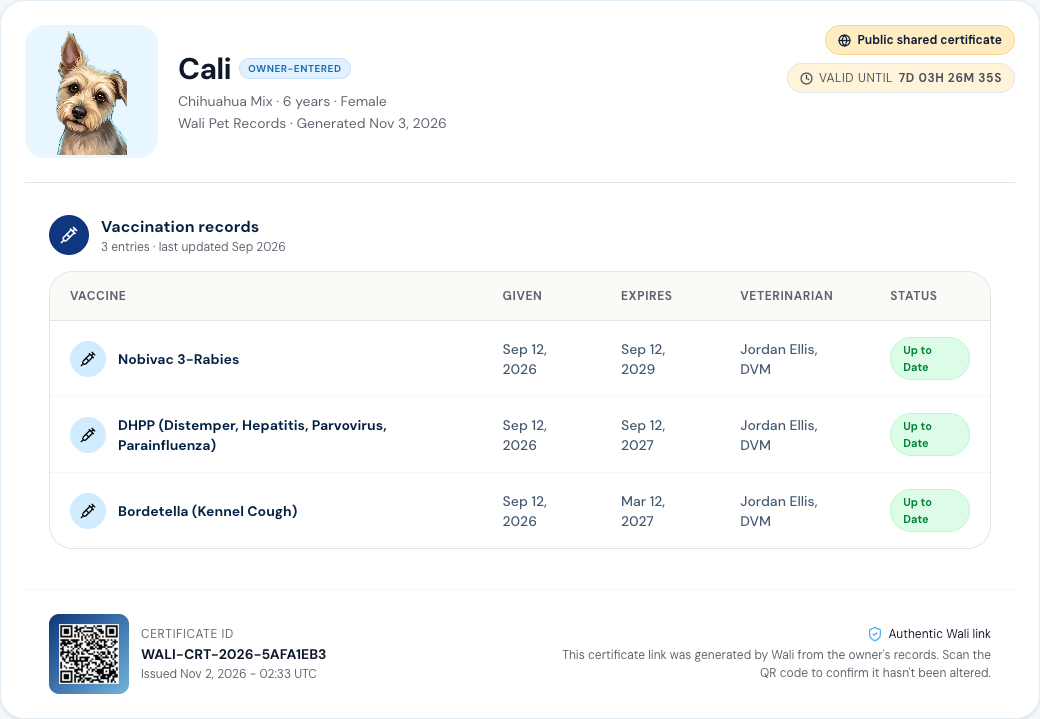
In Wali, your pet’s records are private to your account until you choose to share them. When you create a shareable certificate, you pick what it shows, like vaccinations only, and you can set how long the link works.
The certificate shows the vaccines, the dates and the vet. Your home address and phone number aren’t on it. You can turn the link off anytime, and we never sell your information.
Before you upload
5 questions to ask any pet app
Do they sell or share your data?
Look for a plain answer in the privacy policy, not a maze.
Can you choose what you share?
Sharing should be one record or one certificate at a time, not all or nothing.
Can you turn a shared link off?
A link that lives forever is a copy that lives forever.
Can you get your records out?
You should be able to download what you put in.
Can you delete your account?
And it should be clear what happens to your data when you do.
Privacy Isn’t Hiding. It’s Choosing.
There’s one place your contact information should be easy to find: your pet’s microchip registry. If your pet ever gets lost, that’s how they find their way home, so it’s worth checking that your phone number there is current.
Everywhere else, you get to decide. Send the proof, keep the rest, and you’ll never have to think twice about what’s sitting in a stranger’s text messages.
With three pets, I share proof of vaccines more often than I’d like to count. These days I send the proof and nothing else, and it’s one less thing to worry about.
Be ready for your next vet visit
All your pet's records. Right in your pocket.
Shareable in seconds.